Most songs already have a professionally produced karaoke version available — but every now and then, a request comes in for something obscure, personalised, or simply not covered by any major karaoke publisher. That’s when knowing how to make karaoke tracks yourself becomes genuinely useful.
This guide covers karaoke production from the ground up. It starts with how tracks were authored in the CD+G era, when creating a karaoke disc required specialist software, careful timing work and a reasonable amount of technical knowledge. From there, it moves through the main modern methods: AI-based vocal separation and lyric synchronisation, manual video editing in software like Adobe Premiere Pro, and platform-based creation through KaraFun.
You’ll find a quick step-by-step checklist, a comparison of each method’s trade-offs, and a clear note on licensing before you use anything publicly.
How karaoke tracks were made in the CD+G era
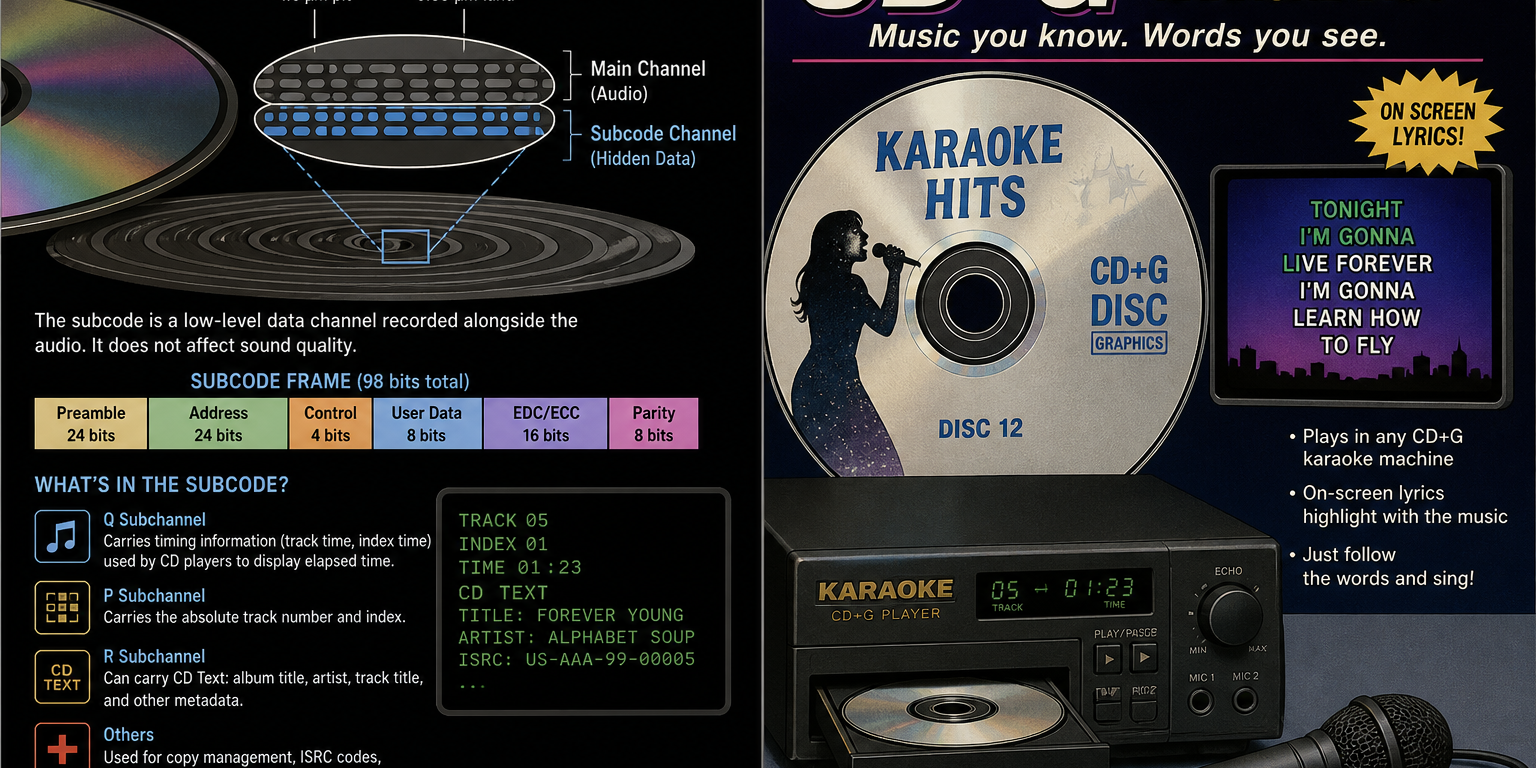
CD+G stands for Compact Disc + Graphics. It was the format that powered most consumer karaoke systems from the late 1980s through to the 2000s, and understanding it explains why karaoke production was once considered specialist work.
A standard audio CD reserves a portion of its data capacity for subcode channels — extra information embedded alongside the audio. CD+G uses one of those channels to store simple graphics: lyrics, background colours and basic animations synchronised to play at precisely the right moment. The audio and visuals were effectively baked into the same disc.
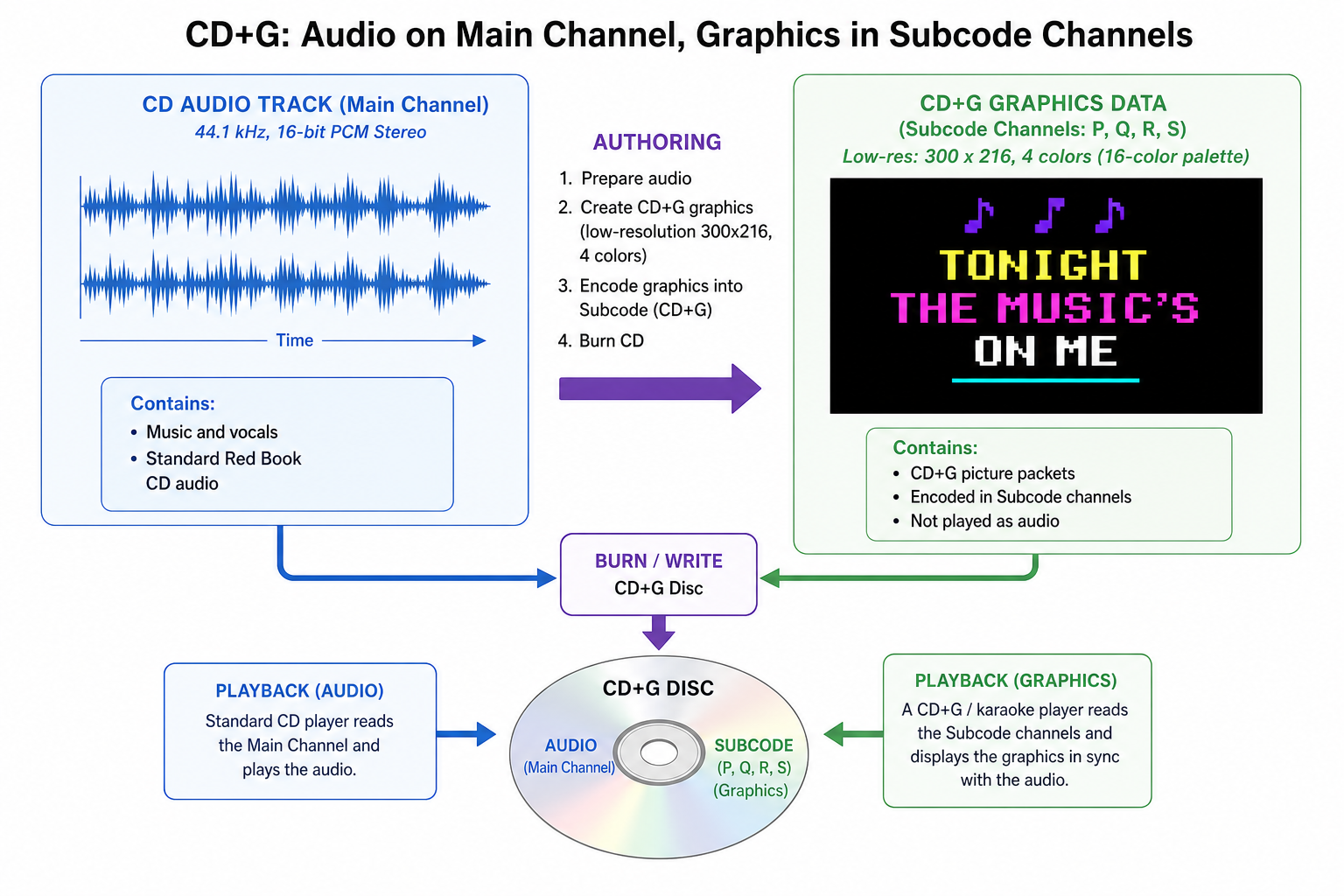
Producing a CD+G disc from scratch involved several distinct stages. First, a suitable instrumental track had to be sourced or created — if no official backing track existed, producers sometimes re-recorded the song or attempted to isolate the instrumental using available tools. The lyrics then needed to be timed precisely, usually by manually stamping individual lines or syllables against a reference playback.
The graphics side added another layer of complexity. CD+G’s display capabilities were severely limited — low resolution with a restricted colour palette — so everything had to be designed within tight constraints. Dedicated authoring software was required to create the graphics, embed timing data and encode the final file, and a compatible disc burner was needed to write the subcode data correctly. Standard CD-burning software couldn’t do it.
The combined result of specialist tooling, manual timing work and hardware requirements meant that professional karaoke authoring was largely the domain of dedicated studios and publishers.
How modern technology changed karaoke production
Three developments have collectively made it far more accessible to make karaoke tracks yourself: AI-based stem separation, automated lyric synchronisation, and modern file formats designed for practical use outside a disc-authoring studio.
AI stem separation can analyse a finished audio mix and isolate the vocal and instrumental elements from each other. The results are genuinely impressive for modern, cleanly produced recordings, though older tracks or songs with heavily blended vocals can still be harder to separate without artefacts.
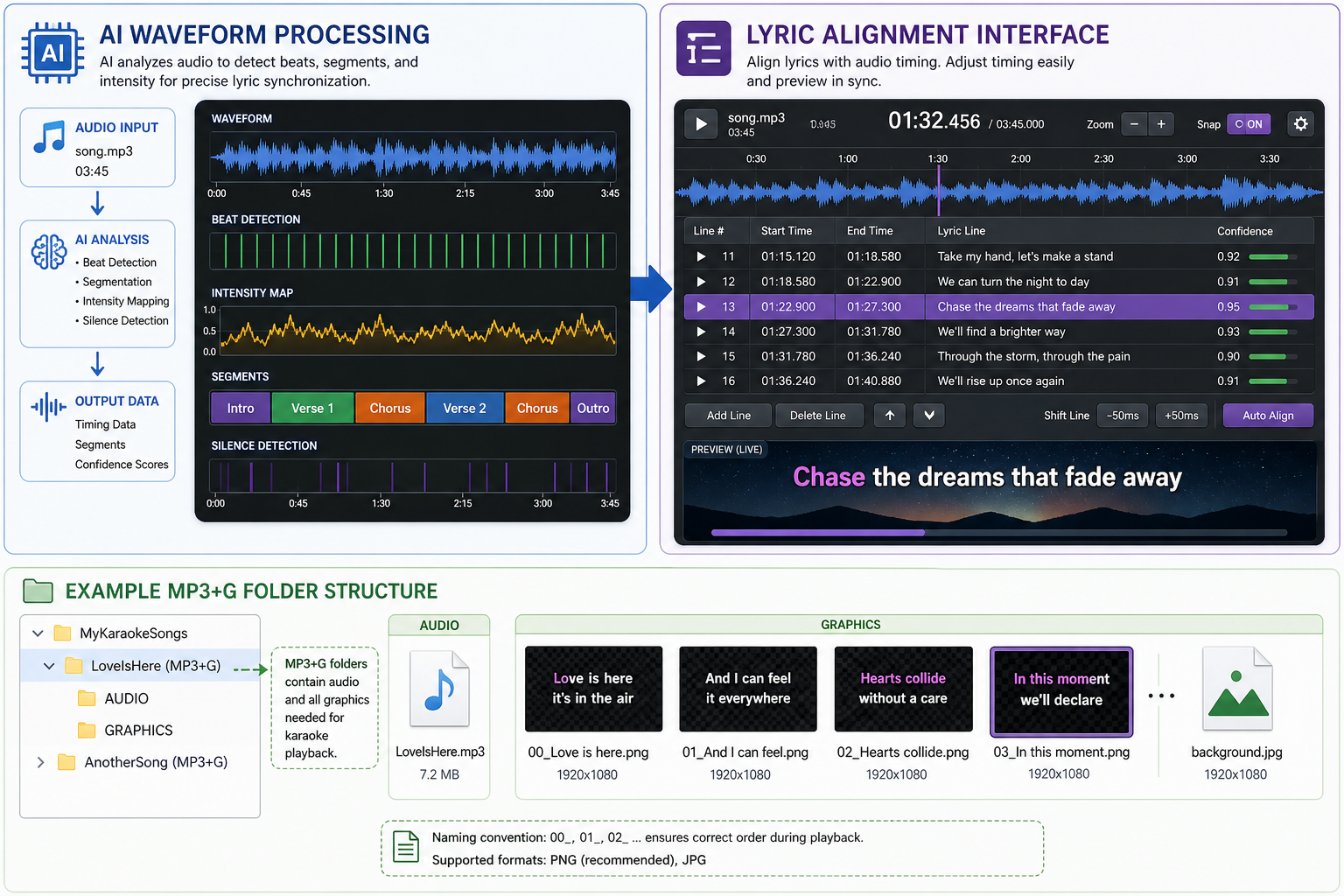
Automated lyric alignment tools can synchronise words or individual syllables to the music — something that once required painstaking manual timestamping. And on the format side, MP3+G has largely replaced CD+G for practical purposes. Rather than burning subcode data to a disc, it stores the audio and graphics as two separate files — an MP3 and a corresponding .cdg file — that most modern karaoke players can read directly.
Together, these tools have brought karaoke track creation within reach of anyone willing to spend a couple of hours learning the basics.
Method 1: AI tools for making karaoke tracks
The core AI karaoke workflow follows a straightforward sequence: separate the vocals from the instrumental, supply or detect the lyrics, align those lyrics to the audio, then render the result as an MP3+G file or a video. Tools to handle each stage now exist across a wide spectrum — from simple one-click web-based generators to developer libraries that let technically minded users build their own pipeline.
How AI vocal separation works — and its limits
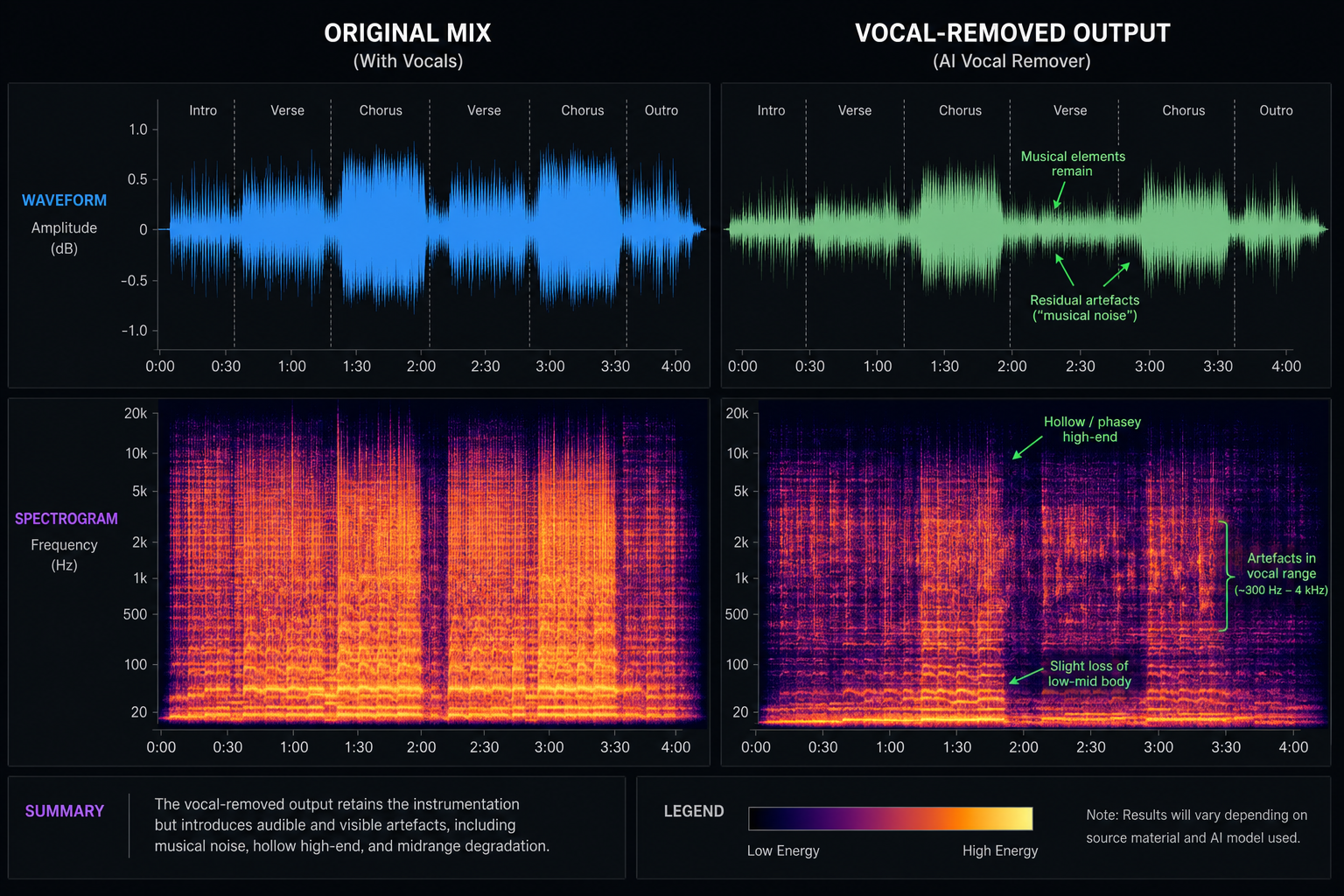
Stem separation works by running a mixed audio track through a machine learning model trained to distinguish vocal frequencies from instrumental ones. The model attempts to output two separate stems: one containing the vocals, one containing everything else.
The quality depends heavily on the source material. Modern recordings with clean production and good stereo separation tend to work very well. Older recordings, tracks where vocals sit deep in a dense mix, or songs with heavy reverb and doubling can be more problematic — leaving traces of the original vocal or introducing warbling into the instrumental.
A few practical tips to improve your results:
- Use the highest quality source file available — compressed low-bitrate audio makes separation harder.
- Try more than one tool or model, as different approaches handle different genres with varying success.
- Apply light post-processing such as EQ or noise reduction to clean up any residual artefacts.
If clean vocal removal is essential and a commercially available instrumental or multitrack exists, that will nearly always produce a better result than AI separation alone.
Lyric synchronisation: automated versus manual
Some tools can pull lyrics from databases or transcribe them from audio, but many require you to paste the text in yourself. Once supplied, alignment algorithms assign timestamps to individual words or syllables based on the waveform.
On a clean, consistently paced studio recording this works well. Auto-sync frequently struggles with rubato passages, spoken-word sections, songs with unusual phrasing, or tracks where timing doesn’t follow a predictable pattern. In those cases, manual correction is usually necessary.
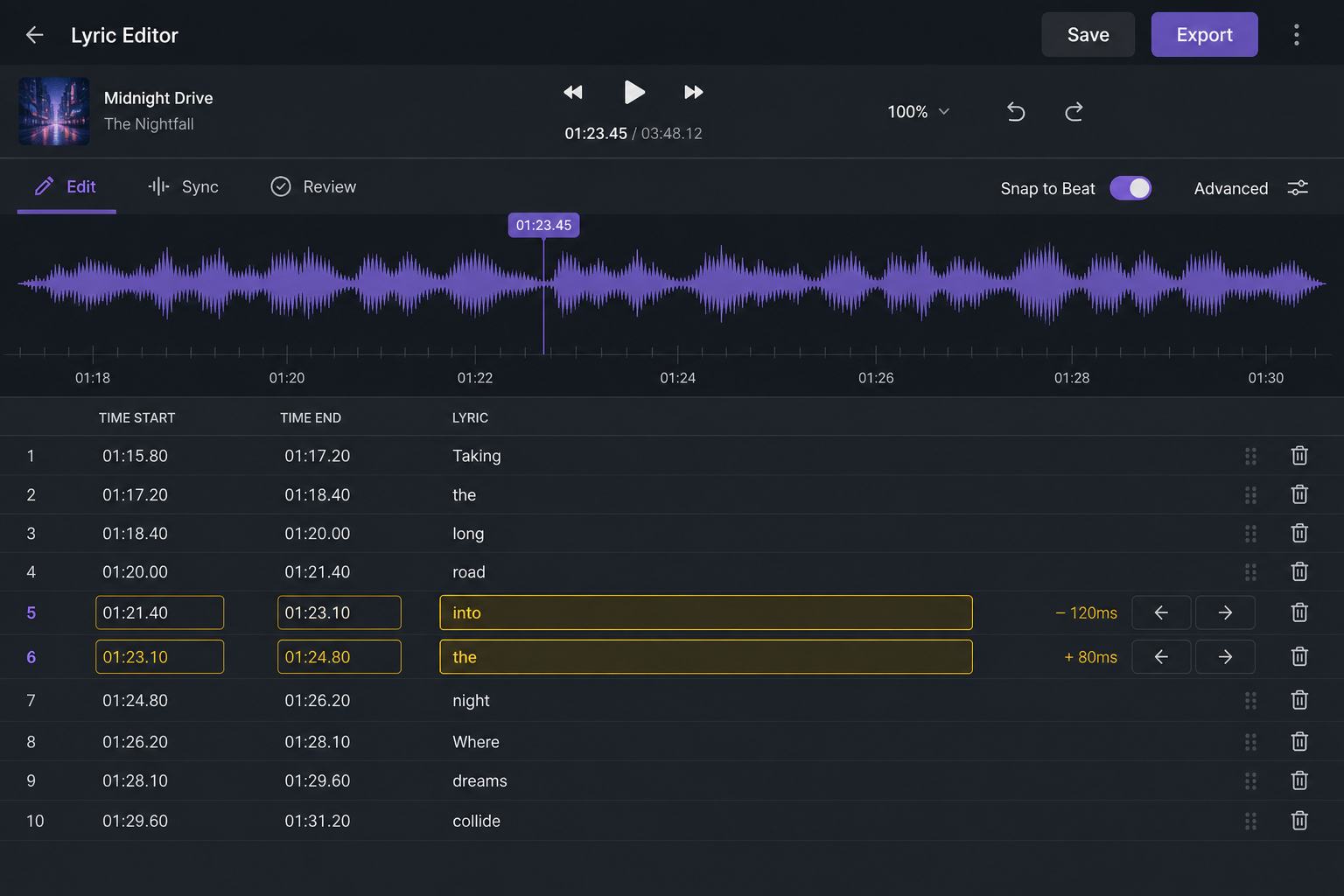
Auto-alignment is a useful starting point, but it’s worth playing through the full track before final export. Mistimed lyrics are immediately obvious to a singer and easy to miss when you’re only spot-checking.
Building your own karaoke-track generator
Building a custom karaoke tool is genuinely feasible for developers, and open-source libraries make it more accessible than it once was. The core components you’d need are:
- Audio input pipeline — loading and pre-processing the source file
- Stem separation model — open-source options exist for AI vocal isolation
- Lyric source — database API, manual input, or audio transcription
- Alignment engine — forced-alignment or ML-based timing libraries
- Renderer — an MP3+G generator or video/graphics engine for output
Community-built projects are worth exploring before starting from scratch, and AI-assisted coding tools can accelerate development considerably. Getting from a working prototype to polished, artefact-free results still takes meaningful iteration.
Method 2: Manually creating a karaoke video in Premiere Pro
If you need full creative control — custom fonts, branded visuals, animated backgrounds — building the track manually in a non-linear editor like Adobe Premiere Pro or Final Cut Pro is the most flexible route. It trades speed for precision, and it’s the right approach when the visuals need to be exactly right.
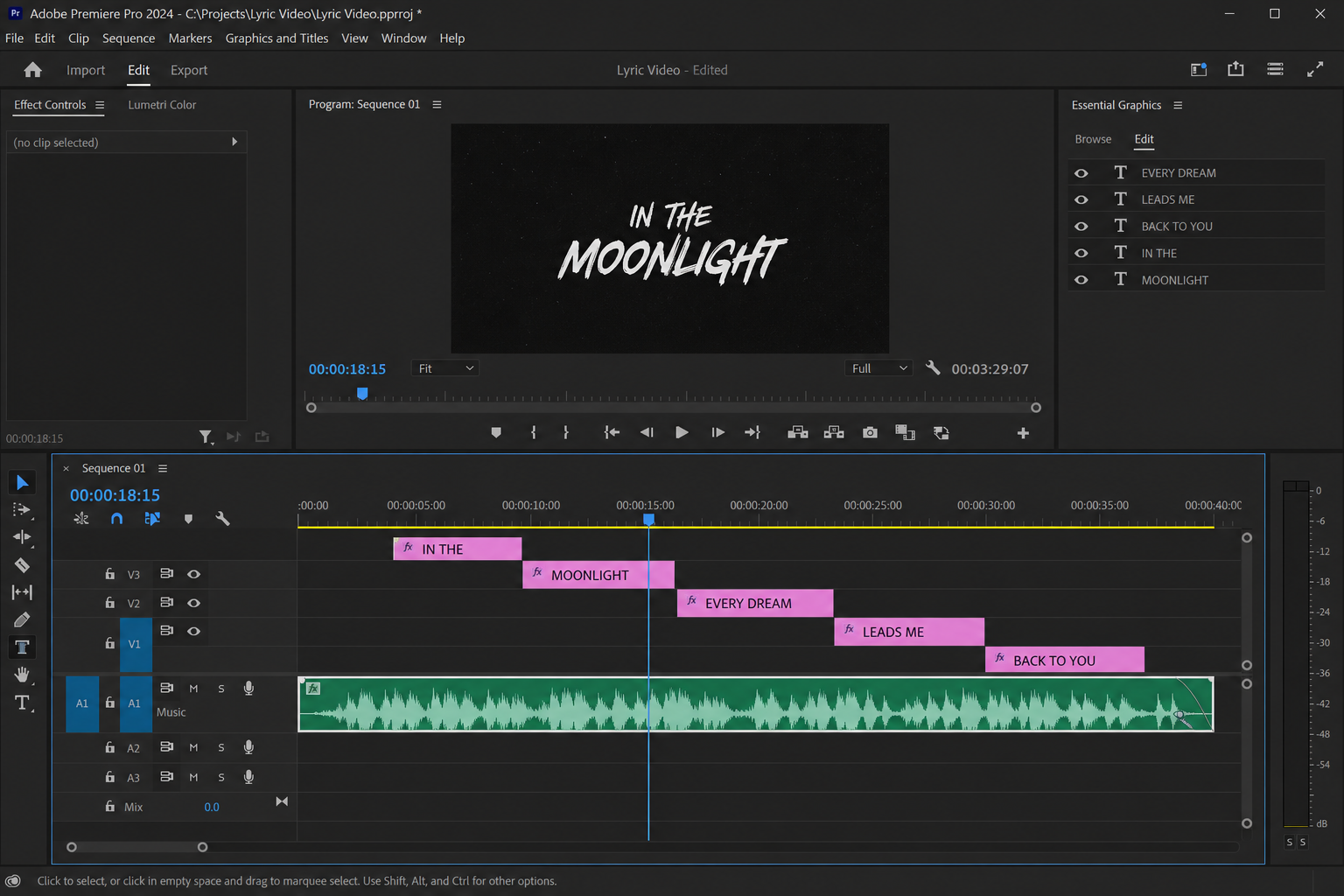
The basic workflow:
- Obtain your instrumental — either a commercially available backing track or a vocal-removed version produced via stem separation.
- Import the audio into your editor and place it on the timeline.
- Add lyrics as text layers — create a new text clip for each line or phrase, positioned above the audio track.
- Manually sync each word or line — drag clip edges and use timeline markers to align text to the music. Zoom in tightly on the waveform to get accurate timings.
- Add visual cueing effects — colour fills, highlights or wipe animations that move across words in time with the singing, telling the performer when to come in.
- Export — H.264 in an MP4 container is the most compatible choice for general playback; for large-screen display where quality matters, ProRes (for archival or re-editing) or H.265 (where device support is confirmed) are suitable alternatives.
Time-saving tips: Use markers to pre-mark beats and phrase starts before placing text. Copy timing from one line and offset it for repeated choruses. Build a reusable sequence template so fonts and effects stay consistent across tracks.
The main drawback is time. Manual lyric sync for a full song can take several hours, even for an experienced editor. This method makes most sense for bespoke commissions, special events, or tracks where automated tools have struggled to produce acceptable results.
Method 3: Making karaoke tracks with KaraFun
For speed and ease of use, KaraFun custom songs is the fastest option for creating a custom karaoke track without touching a video editor or stem-separation library. The platform automates the heavy lifting — vocal removal and lyric synchronisation — so you can go from an uploaded audio file to a playable track in a fraction of the time other methods require.
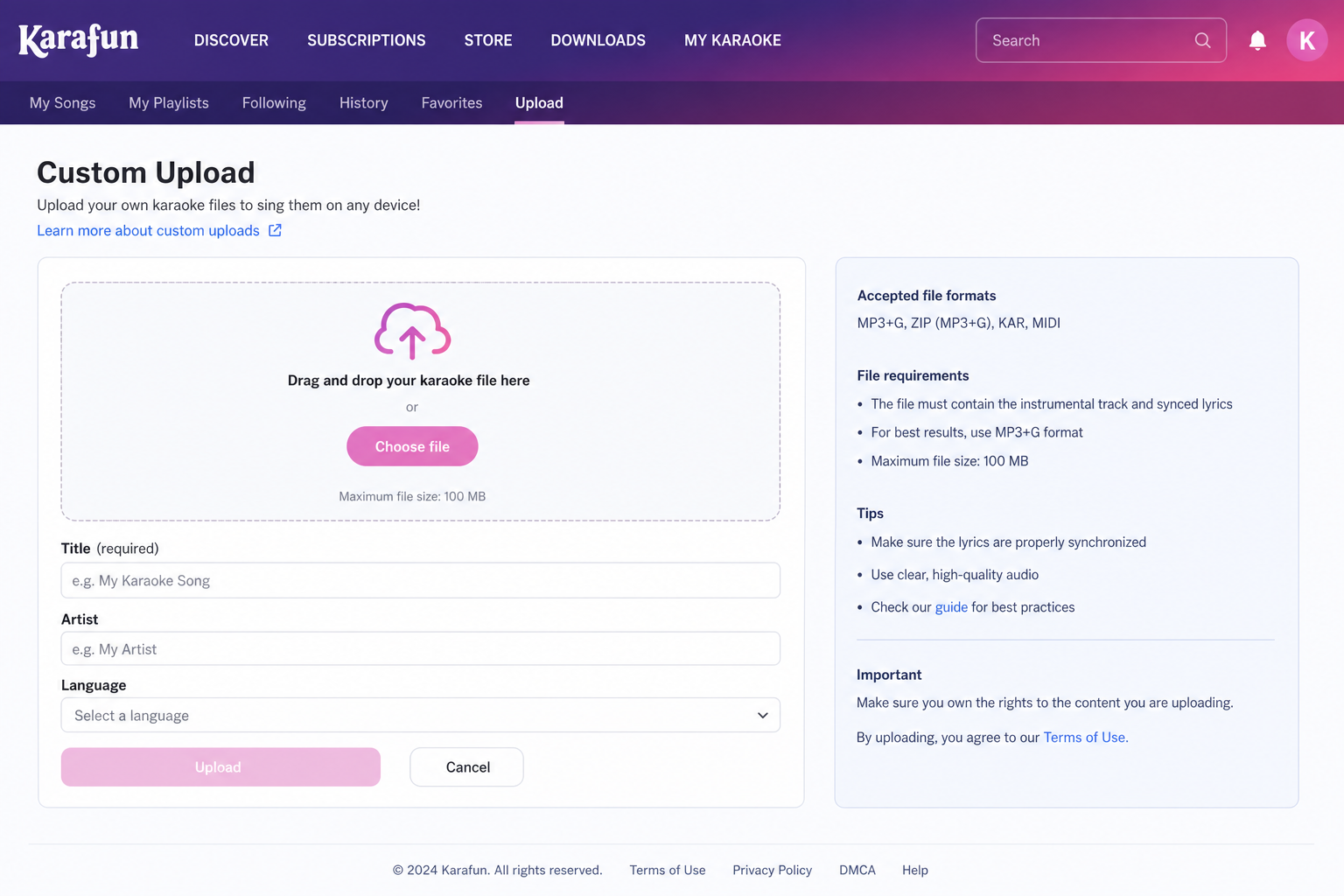
The general process involves uploading your audio, allowing the platform to process vocal removal, supplying or reviewing the lyrics, then correcting synchronisation where needed before saving.
KaraFun limitations to understand before relying on it
KaraFun’s custom song feature is available on paid subscription tiers only — free accounts do not have access to it. Upload limits, supported formats and feature access vary depending on your plan, with the Pro tier offering higher limits and more advanced processing than the standard paid tier.
The more important constraint is portability. Custom songs created through KaraFun are stored within its ecosystem and tied to your account. There is no general option to export a standalone file — such as an MP4 or MP3+G — for playback outside KaraFun’s own apps and supported devices. Redistribution or use in third-party software is not permitted under the standard terms.
These terms can change, so before planning any public performance or commercial use of a KaraFun-created track, verify the current terms of service directly on their site. Do not assume that a track created within KaraFun can be freely used outside the platform without restrictions.
In short: KaraFun is an excellent choice for fast, reliable custom karaoke played within its own ecosystem. If you need portability, full export rights or flexibility for public or commercial performance, confirm those terms first — or use one of the other methods in this guide.
Comparing the methods: difficulty, time, quality and flexibility
No single method is objectively best — each suits different priorities.
| Method | Difficulty | Time | Quality | Flexibility |
|---|---|---|---|---|
| AI tools | Moderate | Fast | Variable | High (exportable) |
| Manual video editing | High | Slow | Excellent | Maximum |
| KaraFun custom | Low | Very fast | Good | Limited to ecosystem |
| Build your own | Very high | Slow initially | Variable | Total |
KaraFun is the right call for a quick custom track at a private event. Manual editing earns its time investment when visuals need to be bespoke. AI separation sits usefully in the middle for exportable files with moderate effort. If you’re working at scale or need full control over distribution, building your own pipeline makes the most sense.
Licensing, rights and public or commercial use
Being able to technically make karaoke tracks does not give you the legal right to perform or distribute them publicly. These are separate questions, and the rules vary by country and platform.
Before using any custom karaoke track commercially or at a public event, check:
- Copyright — does the original recording or composition require permission from the rights holder?
- Performance licences — your country’s performing rights organisation may require a licence for public performances of copyrighted music.
- Platform terms — KaraFun, AI tools and stem-separation services each carry their own usage restrictions.
- AI-generated content — ownership and usage rights for AI-created music are still evolving and vary by tool.
For commercial use, consult your local rights organisation or seek independent legal advice. This article is a practical guide, not legal counsel.
Quick checklist: how to make a karaoke track
- Source audio — use the highest-quality recording you legally have access to.
- Choose your method — KaraFun (fastest), AI stem separation with auto-sync (balanced), or manual video editing (full visual control).
- Remove vocals — use AI separation or a commercially available instrumental.
- Add lyrics — paste accurate lyrics, run auto-alignment, then proof and correct timing.
- Render and test — export as MP3+G or a karaoke video and test on your target player.
- Check licensing — verify permissions before any public or commercial performance.
Tools, resources and where to get help
Key tool categories to explore: stem separation tools (try a few to find the best result for your specific track), lyric alignment tools, video editors, MP3+G renderers, and KaraFun for platform-based custom creation.
For event-grade karaoke or a tricky custom track, contact The Karaoke Company.
Making karaoke tracks is far more accessible than it once was. Pick the method that suits your needs, verify licensing for public use, and get in touch if you need professional help.